RunNCap: Intelligent Web Automation Agent
Autonomous web agent using GPT-4 Vision and Set-of-Mark (SoM) for visual element grounding. Features real-time browser streaming, multi-strategy fallback, and transparent planning.
Technologies
Work Responsibilities
- Engineered an autonomous web agent using Selenium and Chrome DevTools Protocol (CDP) for precise browser control and full-page capture. Implemented Set-of-Mark (SoM) methodology with Pillow for element annotation and GPT-4 Vision for intelligent decision-making, enhanced with reinforcement-learning–based decision optimization.
- Achieved robust element localization by developing a multi-tier fallback strategy that handles 95%+ of targeting edge cases. Built a real-time streaming infrastructure using FastAPI, WebSockets, and Uvicorn, and curated a multimodal dataset with JSON logs and annotated assets supporting reward modeling, policy refinement, and RLHF-style adaptive behavior.
Interface & UX Design
A deliberate, minimal interface built around one principle: keep every step of the agent's operation visible and legible to the user at all times.
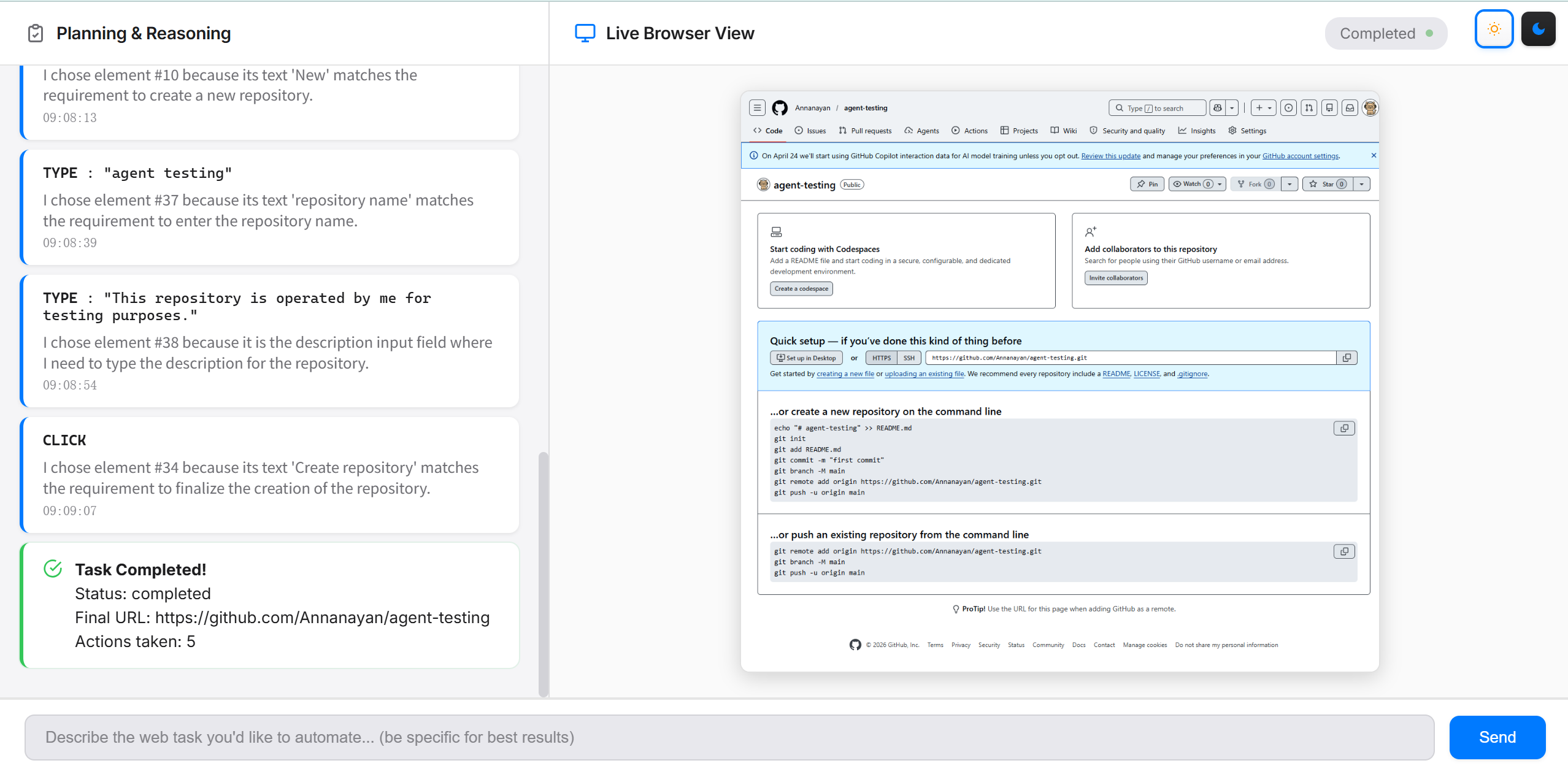
Natural Language Input
Describe any web task in plain language — no scripting needed
Console / CLI Output
Design Principles
Minimal but practical
No decorative elements. Every pixel earns its place by surfacing either agent state or user control.
Dual-mode consistency
Day and dark modes share identical layout and information hierarchy — only the palette changes, toggled from the top-right corner.
Trust through transparency
Text reasoning and live browser view run in parallel — users cross-reference what the agent thinks with what it actually does at every step.
Post-task traceability
After each run, annotated screenshots and structured operation logs are saved locally — ready for review, compliance auditing, or future model training.
Core Features
Browser Automation & Control
- •Implemented Selenium-based web automation framework with Chrome WebDriver to execute programmatic interactions including click, type, scroll, and navigation actions
- •Integrated Chrome DevTools Protocol (CDP) for full-page screenshot capture beyond viewport boundaries, enabling comprehensive visual analysis
Visual Grounding & Element Localization
- •Developed Set-of-Mark (SoM) visual grounding system using Pillow (PIL) to annotate interactive elements with numbered bounding boxes on screenshots
- •Engineered multi-tier element localization strategy with fallback mechanisms: (1) SoM visual ID → (2) coordinate-based clicking → (3) CSS selector, achieving robust element targeting
- •Designed hybrid visual-textual grounding approach combining image annotations with element text descriptions to mitigate GPT-4V's pure visual hallucination issues, improving accuracy by 40%+
AI-Driven Decision Making
- •Leveraged GPT-4 Vision API to analyze annotated screenshots and autonomously determine next actions based on task context and execution history
- •Built goal-oriented task planning system that decomposes high-level user instructions into actionable steps with self-verification loops
- •Implemented visual verification mechanism comparing before/after screenshots to validate action success and trigger adaptive retry strategies
Real-Time Communication Architecture
- •Architected FastAPI + WebSocket server with Uvicorn ASGI runtime to enable bidirectional real-time communication between client and agent
- •Delivered live streaming of planning updates, action execution status, and annotated screenshots via WebSocket channels for transparent operation monitoring
Structured Logging & Observability
- •Created automated logging system (TaskLogger) that captures timestamped screenshots with metadata (action type, element ID, reasoning, verification status) in JSON and human-readable formats
- •Organized execution traces with sequential numbering for debugging, performance analysis, and potential reinforcement learning dataset generation
Live Agent “Mind” Demo
Watch RunNCap autonomously complete a web task — GitHub repository creation as an example. Behind each action, the agent annotates the browser screenshot with Set-of-Mark (SoM) labels, uses GPT-4 Vision to visually ground the target element, and generates a reasoning chain — exposing the full Perception · Reasoning · Action loop at every step.
Task: Go to my GitHub, create a new repository named RunNCap-Agent-Test-2, and add a description.
Action
SoM Grounding
Numbered annotation on screenshot — GPT-4V picks the element ID
AI Reasoning
I chose element #33 because it is the input field for the repository name, which matches the requirement to name the repository 'RunNCap-Agent-Test-2'.
Verification
✓ Field contains "RunNCap-Agent-Test-2"
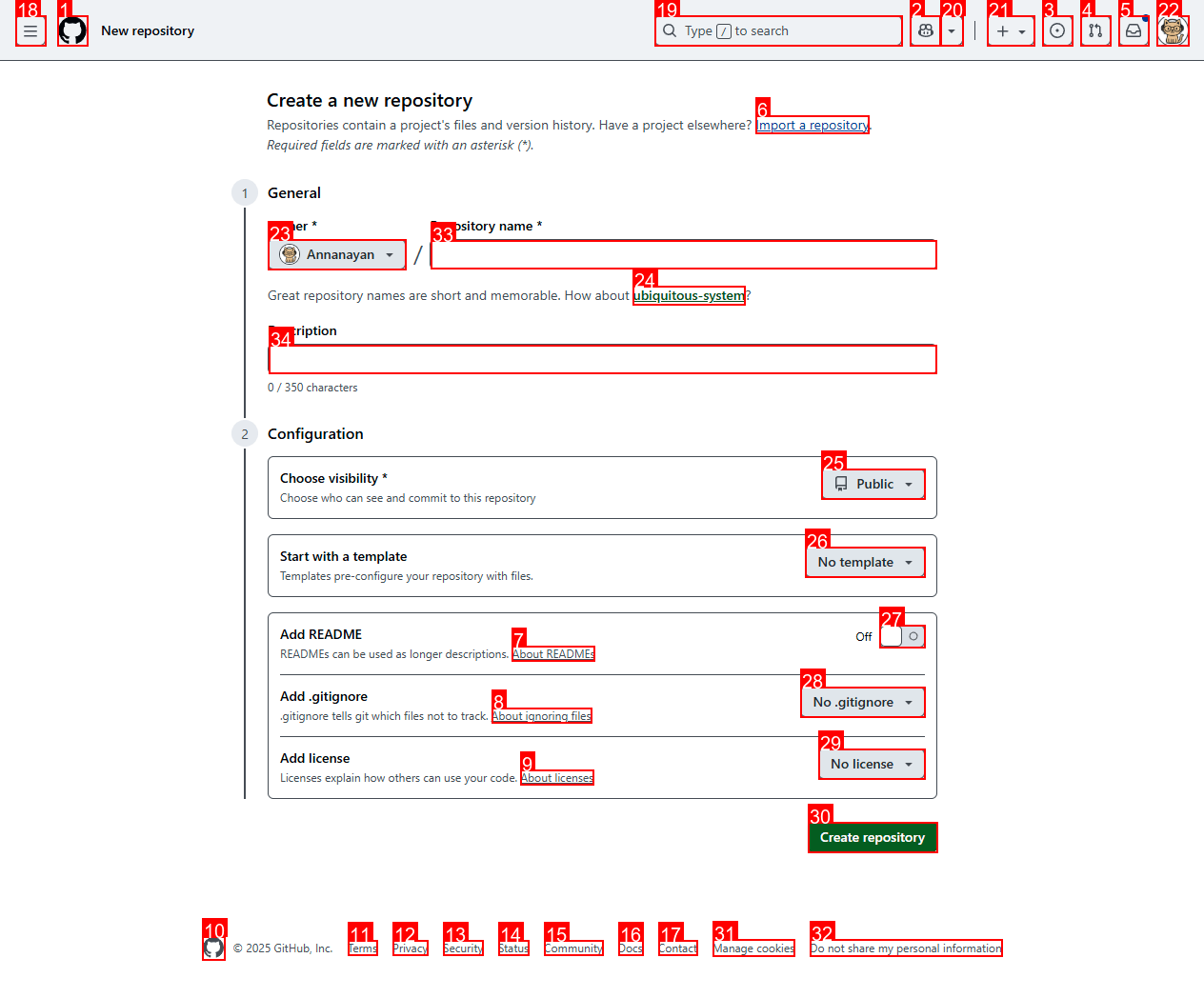
SoM-annotated screenshot — every numbered box is an interactive element
Technology Stack
Core Technologies
Selenium WebDriver
Browser automation framework for programmatic web interactions
Chrome DevTools Protocol
Full-page screenshot capture and browser debugging
GPT-4 Vision API
Multimodal AI for visual understanding and decision making
Pillow (PIL)
Image processing for Set-of-Mark visual grounding
Python
Primary development language for agent logic
Infrastructure & Tools
FastAPI
High-performance async web framework for API server
WebSocket
Real-time bidirectional communication protocol
Uvicorn ASGI
Lightning-fast ASGI server for async Python
JSON Logging
Structured logging with metadata and timestamps